
More GB

iPhone storage, measured

Storage almost full? Get the room back.

More GB shrinks the photos and videos you choose, which lowers the number in Settings, and asks iOS to hand over the cache it is holding, so that room is usable right now. Every result is measured before and after, never estimated.

Join the TestFlight beta

Free to try on iOS 18 and later.
Coming to the App Store.

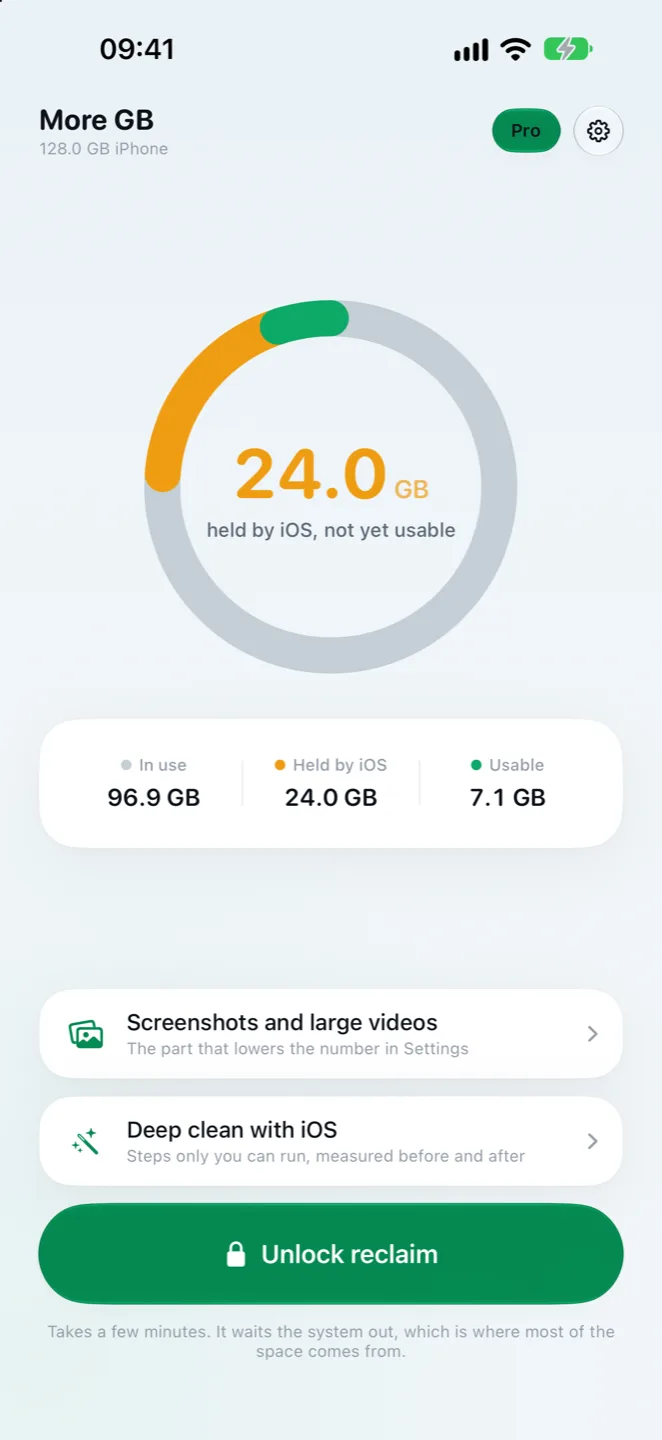
More GB home screen: 24.0 GB held by iOS, 96.9 GB in use and 7.1 GB usable on a 128 GB iPhone.

Settings calls part of your storage free held by iOS.

Example reading from a 128 GB iPhone. The app reads your own figures from iOS.

Two kinds of room, and the app tells you which is which.

Some space shows up as a lower number in Settings. Some shows up as room you can finally use. More GB does both and never mixes them up.

Lowers Settings

Shrink and clear your photos and videos

Your own photos and videos are the only thing any app can take off the used figure in Settings. More GB finds what takes the most room:

  • Large videos re-encoded to HEVC, or 4K brought down to 1080p
  • ProRAW photos rewritten as full-size HEIC
  • Old Live Photos turned into stills
  • Screenshots, screen recordings, bursts and near-duplicates

Nothing changes until you choose it, and every rewrite keeps the date, place, favourite mark and albums. Deleted items wait in Recently Deleted for 30 days; the app reminds you to empty it.
Usable now

Make the cache iOS is holding usable

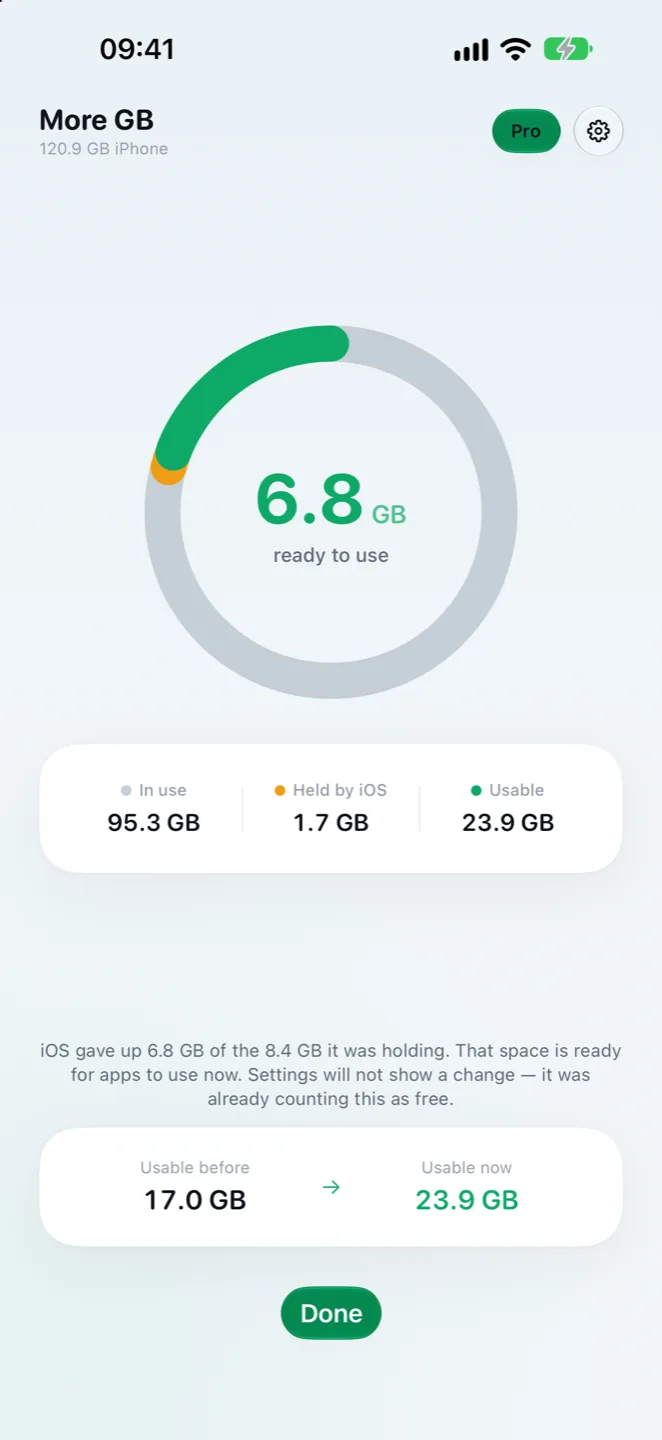
More GB asks iOS for the room it says it can spare, then hands it straight back as free space. None of your files are touched.

More GB result screen: 6.8 GB ready to use, usable space from 17.0 GB to 23.9 GB.
Usable before
17.0 GB
Usable after
23.9 GB
One run, iPhone 14

Settings already counts this cache as free, so its used figure does not change. How much comes back is up to iOS; some runs return nothing, and the app says so.

What it will not pretend to do

Most storage cleaners promise to wipe System Data. None of them can, and neither can this one.

Empty System Data

iOS gives no app a way into System Data or into another app's cache, WhatsApp included. Where a step only you can take would help, like the ProRes clean-up on Pro models, the app walks you through it and measures the result.

Guess a number

Every figure is read from iOS before and after. When iOS keeps its cache, the app reports that instead of a success screen.

Watch you

No account, no analytics, no tracking. Your photos are processed on your iPhone and never uploaded.

Questions

Why does my iPhone say storage is full when Settings shows free space?

Settings counts the cache iOS is holding as free, but apps cannot write into it until iOS clears it. A video or an update can run out of room while Settings still looks fine. More GB asks iOS to clear that cache now, so the space is usable.

Can an app clear System Data on iPhone?

No. iOS does not let any app empty System Data or another app's cache, including WhatsApp. More GB does not claim to. What lowers the used figure in Settings is shrinking or deleting photos and videos, then emptying Recently Deleted.

Does More GB delete my photos?

Only the photos and videos you pick, and iOS asks you to confirm every change. Converted items keep their date, place, favourite mark and albums, and deleted items go to Recently Deleted first.

Why did a run return nothing?

iOS decides how much of its cache to release, and it gives up little when the phone still has plenty of free space. The app reports a run that returned nothing as nothing.

More answers and support

See what your iPhone is really holding.

The full storage breakdown is free. The clean-up tools are part of Pro.

Join the TestFlight beta